Main Points
- Automate repeated work that follows clear rules, and fix the process first when the rules keep changing.
- Sorting, matching and syncing deliver more than clever automated replies.
- Every automation needs an owner, an alert and an exception queue.
- Plan 15 to 25 percent of the build effort for yearly upkeep.
Automation advice is full of tools and light on results. I find it more useful to look at what actually changed a number: hours, errors or release speed. If you are weighing a project of your own, the first stop is usually software automation consulting, where these examples come from.
Here are nine automations I have helped build or review. Each shows the task, why it worked, the steps and the tooling. The outcomes are from my client work, so your numbers will differ.
The Nine Examples Compared
Effort here means build time plus change in how people work. Time to first gain is the usual wait before a number moves.
| Example | Area | Effort | Time to first gain |
|---|---|---|---|
| 1. Invoice Intake With Automatic Matching | Finance | Medium | Six weeks |
| 2. Lead Routing and Follow-Up Reminders | Sales | Low | Two weeks |
| 3. A Build and Deploy Pipeline With Automated Gates | Engineering | Medium | Eight weeks |
| 4. Regression Tests That Run Overnight | Quality | Medium | Ten weeks |
| 5. Order Data Synced Between Systems | Operations | Medium | Six weeks |
| 6. New Employee Setup in One Request | HR | Low | Four weeks |
| 7. Ticket Triage by Rule and Keyword | Support | Low | Three weeks |
| 8. A Monthly Report That Builds Itself | Reporting | High | Eight weeks |
| 9. Environments Created From Code | Infrastructure | Low | Two weeks |
| 10. Dependency Updates and Patches on a Schedule | Security |
Invoice Intake With Automatic Matching
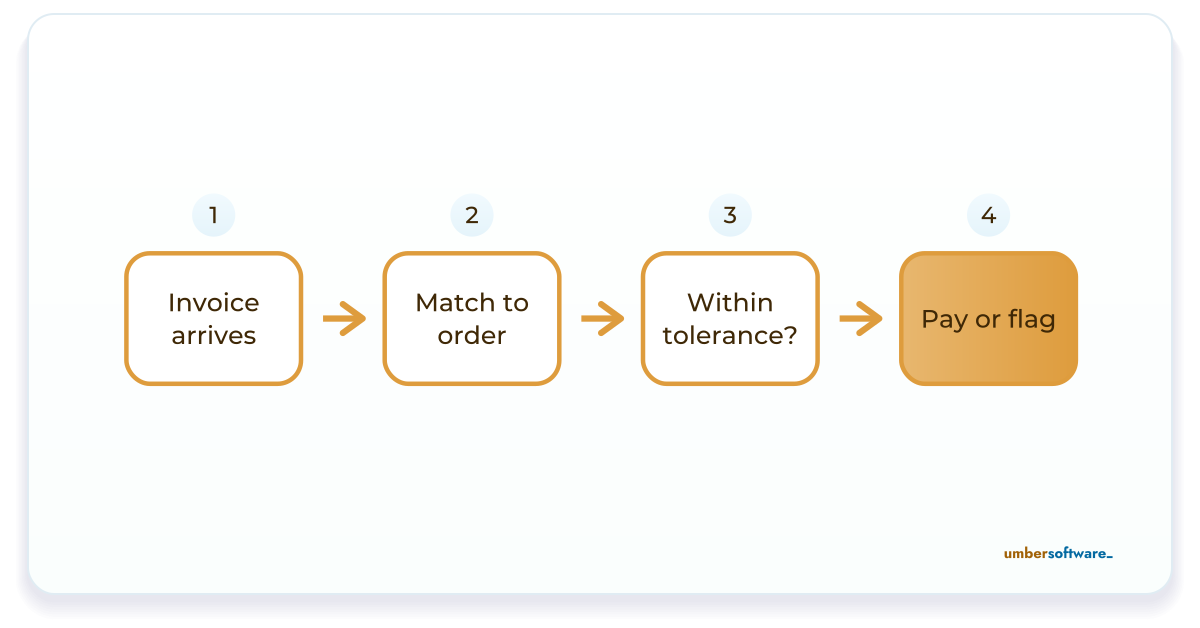
A distributor I worked with had two people typing supplier invoices into the ERP for most of every week. My team set up capture of the incoming PDFs, matched each one to its purchase order and routed only the mismatches to a person. About four in five invoices then posted without a touch.
The needle moved because the rules were already written: price tolerance, quantity tolerance and an approval limit. The software only applied them faster. The remaining exceptions turned out to be the interesting ones, mostly supplier master data that nobody had ever cleaned.
Setting Up the Flow
- Collect 200 recent invoices and sort them by supplier.
- Write the matching rules and tolerances.
- Capture invoices from one shared mailbox.
- Post matches automatically and queue mismatches.
- Review the exception queue weekly for the first month.
Typical Tooling
Document capture services and your ERP's own matching feature cover most cases. A workflow platform handles the approval routing.
Lead Routing and Follow-Up Reminders
A software company had leads waiting up to two days before anyone looked at them. A routing rule that assigned each lead by region and size, plus a reminder when nobody had touched a deal for three days, cut the first-response time to under an hour in my client's own report.
The automation was a dozen lines of logic and a notification. The harder work was agreeing on the routing rules with the sales leads, which took two meetings and one argument about territories.
Building the Routing
- Write the assignment rules on one page.
- Test them against last month's leads.
- Set an owner field and a time limit in the CRM.
- Send a reminder when the limit passes.
- Review misrouted leads every week.
Where It Runs
Most CRMs have built-in assignment rules. A workflow tool adds reminders and chat notifications.
A Build and Deploy Pipeline With Automated Gates
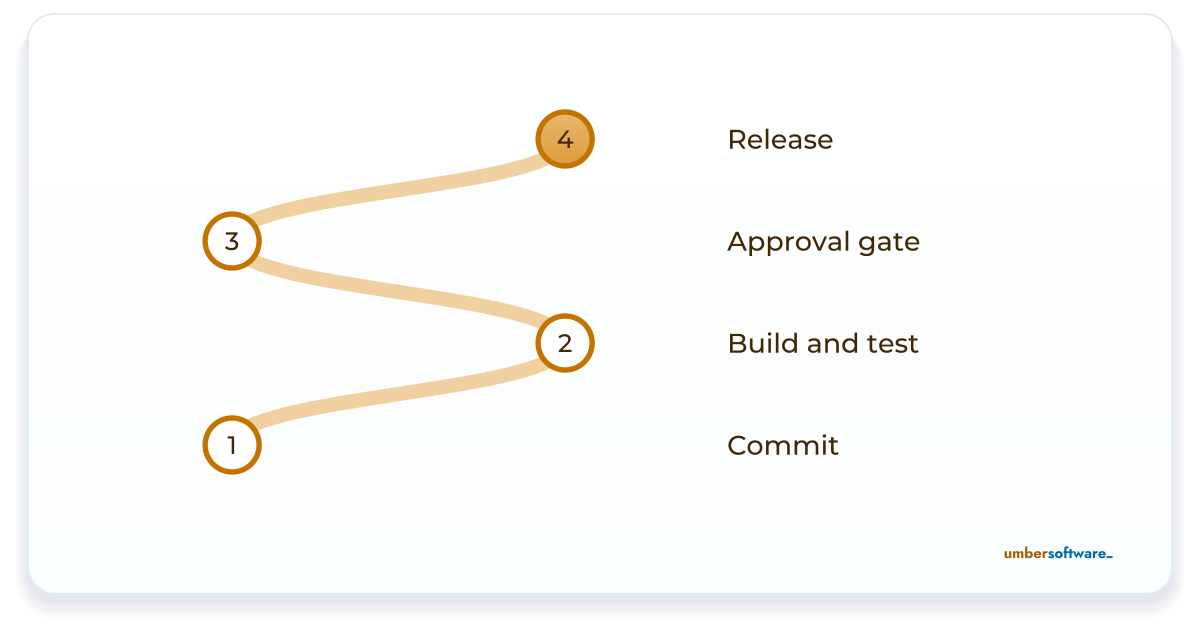
A healthcare software team released once a month, after a weekend of manual testing and deployment. My team moved the build, unit tests, security scan and deployment into one pipeline that ran on every change. Releases became weekly, and then daily for small fixes.
The pipeline did not remove the need for judgment. It moved judgment to the gates: what must pass before code reaches production. Defects found in production fell, because the same checks ran every time, including at 5 p.m. on a Friday.
Moving to a Pipeline
- Script the build so that a clean machine can repeat it.
- Add fast unit tests as the first gate.
- Add dependency and secret scanning.
- Deploy to a staging environment automatically.
- Release to production with one approved click, then remove the click later.
Common Choices
GitHub Actions, GitLab CI and Jenkins all work. Pick the one that sits closest to your code and your approvals.
Regression Tests That Run Overnight
A manufacturing client spent three days before every release clicking through the same 140 test cases. My team automated the stable core of them and ran the suite every night. The testers moved to exploratory testing, where they found problems that scripts never would.
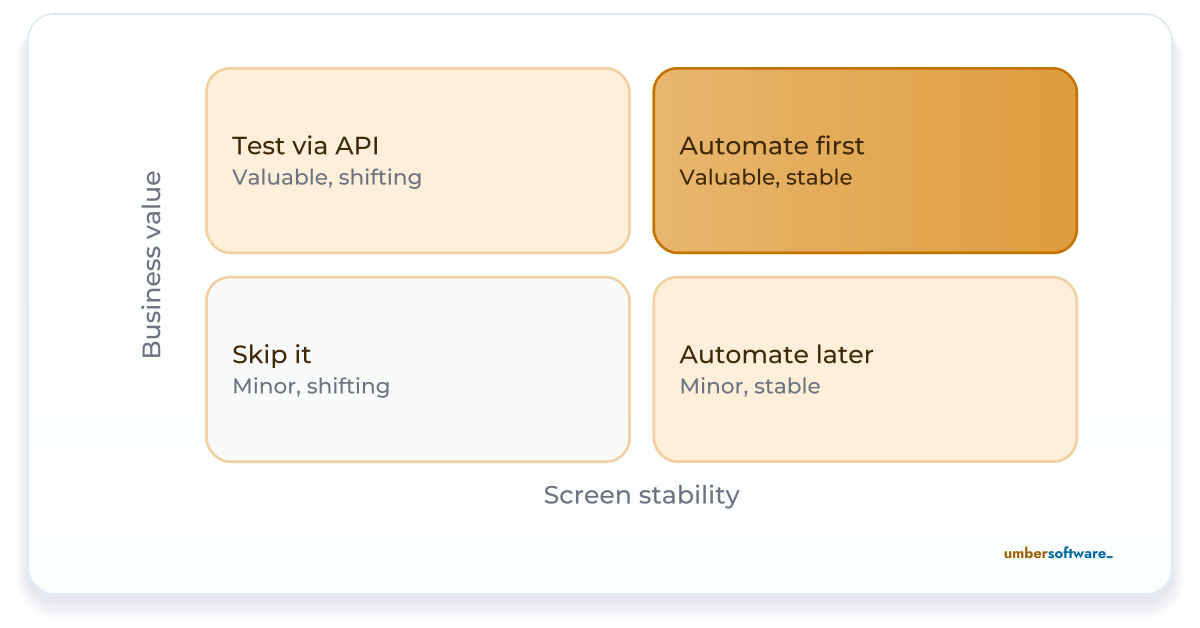
Automating everything is a trap. Tests of screens that change every sprint cost more to maintain than they save. Automate the paths that matter to money and safety, and leave the volatile ones manual.
Choosing What to Automate
- Rank test cases by business risk.
- Automate the stable top 30 percent first.
- Run the suite nightly and review failures each morning.
- Delete flaky tests quickly or fix them within a week.
- Track suite run time and failure rate.
Test Tooling
Playwright and Cypress cover web interfaces, and API tests run faster and break less. Use both in a thin layer.
Order Data Synced Between Systems
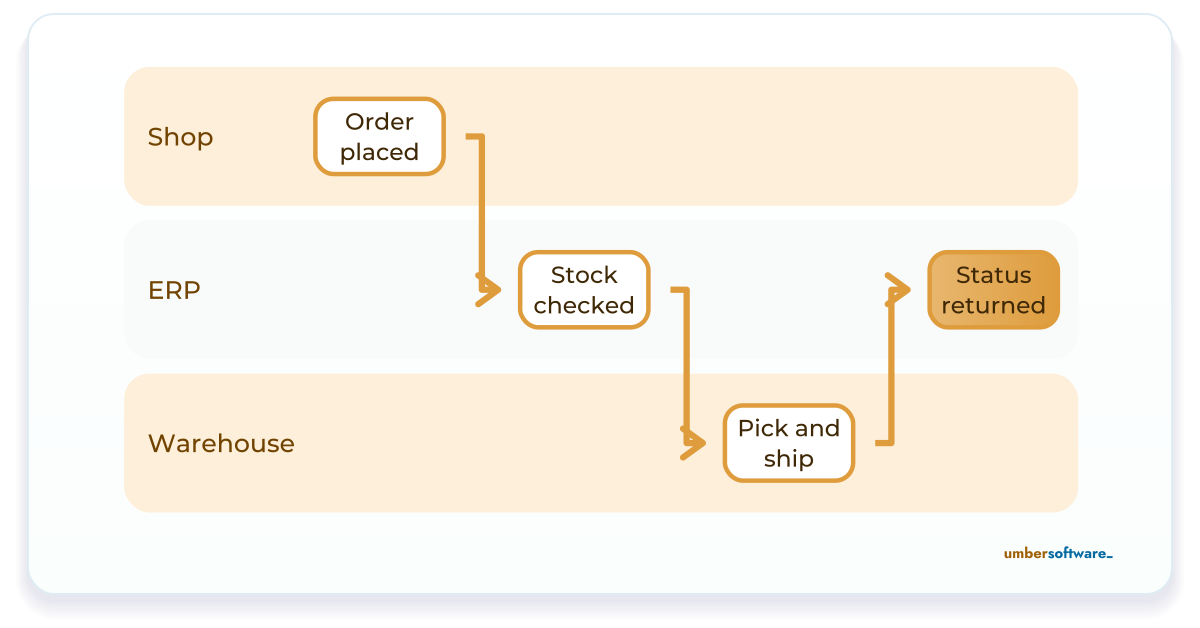
A logistics company copied orders from its web shop into the warehouse system by hand, twice a day. A monitored integration now passes each order within minutes, with a clear error queue for anything that fails. Order errors fell by well over half in their first quarter.
The saving came less from the missing typing than from the missing mistakes: wrong quantities, missed orders and duplicate shipments. The team also got a reliable log of what arrived when.
Connecting the Systems
- Decide which system owns each field.
- Map the order fields between the two systems.
- Build the sync with retries and an error queue.
- Alert someone when an order sits in the queue for 15 minutes.
- Reconcile counts at the end of each day.
Integration Options
Native connectors work for standard shops and ERPs. Custom APIs or an integration platform fit when rules differ.
New Employee Setup in One Request
Onboarding a new hire meant six emails to six teams for accounts, equipment and access. A single request form now triggers each task automatically and tracks completion. New staff have working accounts on their first morning, and IT stopped chasing for details.
The same pattern covers leavers, and that is where it pays back in security: access is removed on the last day without anyone remembering to ask. I now start every onboarding automation with the offboarding path.
Automating Joiners and Leavers
- List every account and item a role needs.
- Create one request form with role and start date.
- Trigger account creation in each system.
- Create tasks for equipment and training.
- Mirror the flow for leavers and review it quarterly.
Starting Points
Your identity provider and HR system probably have connectors. A workflow tool glues the remaining steps together.
Ticket Triage by Rule and Keyword
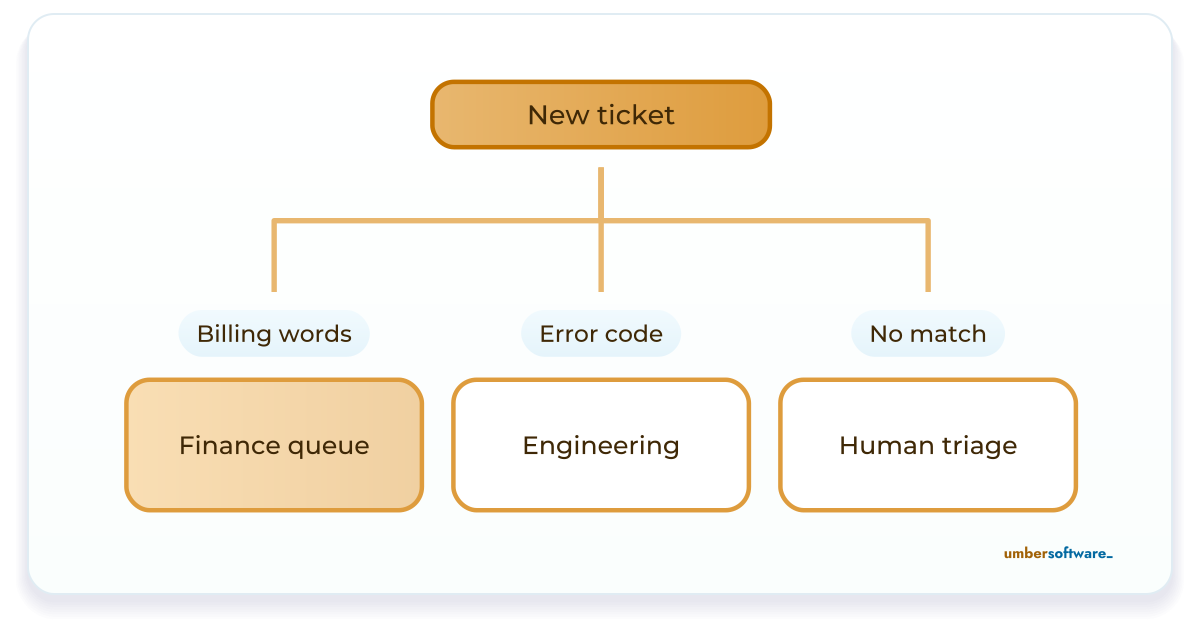
A software vendor had two agents spending the morning sorting new tickets into queues. Rules based on product, plan and keywords now route most tickets, tag urgency and attach suggested articles. Agents start with the right ticket in front of them.
Resist the urge to automate replies early. Sorting and tagging gave the team most of the benefit with almost no risk, and it created clean data to judge later automation against.
Triage in Four Layers
- Export 500 tickets and group them by cause.
- Write routing rules for the five biggest groups.
- Tag urgency from plan type and keywords.
- Review rerouted tickets daily for two weeks.
- Add suggested articles once routing is stable.
Where to Build It
Helpdesk tools include rule engines. Add a small script only when rules need data from outside the helpdesk.
A Monthly Report That Builds Itself
An operations manager spent two days each month pulling numbers from four systems into one slide deck. A scheduled job now collects the data, checks it against last month and publishes the report. She spends the time reading it instead.
Automated reports need a sanity check, or a broken feed will quietly publish nonsense. My team added range checks that stop the job and send a message if a figure moves more than 40 percent.
Automating a Report
- Write down each number and where it comes from.
- Pull the data with scheduled queries or exports.
- Add range checks against the last period.
- Publish to a fixed location and notify readers.
- Keep one person responsible for the data feeds.
Typical Stack
A spreadsheet with scheduled imports works for small cases. A BI tool or a short script fits larger ones.
Environments Created From Code
A software team waited a week for test environments and then argued over why they differed from production. Describing infrastructure in code let them create a full copy in about twenty minutes and delete it afterward. Bugs that only appeared in production became rare.
The shared definition mattered more than the speed. When environments come from one source, drift stops. The cost is upfront learning, so start with one service and not the whole estate.
Moving to Infrastructure as Code
- Pick one service and describe its infrastructure in code.
- Store the code with the application.
- Create a test environment from it.
- Review changes like application code.
- Switch off manual changes in production.
Tool Options
Terraform and the cloud providers' own templates are the usual choices. Pick the one your team will still maintain in two years.
Dependency Updates and Patches on a Schedule
A software team patched its libraries only when an audit forced it, which meant long, risky update days. An automated job now opens a small update request each week, runs the test suite against it and flags only the ones that fail. Update days disappeared.
Small, frequent changes are easier to review than one huge one. The job also gave the team a record of what was updated and when, which made the next security review much shorter.
Keeping Dependencies Current
- Turn on automated update requests for one repository.
- Require the test suite to pass before merge.
- Group low-risk updates into one weekly batch.
- Review major version changes by hand.
- Track the age of the oldest dependency.
Tools for the Job
Dependabot and Renovate open the update requests, and your pipeline runs the tests. Add a vulnerability scanner for alerts between updates.
What the Nine Examples Have in Common
Every one of them started with a rule that someone could already write down. None of them needed advanced technology. The gains came from consistency: the same check at the same time, every time, without anyone getting tired. When the work is rule-based, a computer is simply a patient colleague.
The failures I see have a different pattern. A team automates a process that nobody has agreed on, or builds without a way to see errors, or leaves the system with no owner. The method I use to avoid this is the scoring approach in my software automation framework, which ranks candidates before anything is built.
You can also work from a wider list. My collection of software automation use cases maps twelve areas by impact, and the review of automation software compares the platforms that run workflows and bots.
How to Choose Your First Automation
Pick the example that matches a pain you can count. A few signals help:
- People retype data between systems: start with a sync or capture flow.
- Releases are slow and scary: start with a pipeline and a nightly test run.
- Requests wait in an inbox: start with routing and triage.
- A recurring report eats days: start with a scheduled report.
Count the hours per month and the errors per month before you start. Build the smallest version, run it for a month and compare. If the numbers move, take the next example. If you want help judging which one fits, a short call settles it quickly.
Questions About Software Automation Examples
What Is Software Automation?
It is the use of software to do repeatable work without manual effort, such as moving data between systems, running tests, routing requests or building reports. It covers both business processes and the engineering work of building software itself. The common thread is a rule that a computer can follow.
Which Example Should a Small Company Start With?
Start with the task that takes the most hours and follows the clearest rules. For many small companies that is invoice entry, lead routing or a monthly report. Each of them can be live in a few weeks and gives you a number you can compare.
How Much Does Software Automation Cost?
It depends on the tools and the integration work. Light workflow tools start at a few dozen dollars a month, and larger platforms are quoted per bot or per user. Add build time, testing and yearly maintenance, which in my projects is 15 to 25 percent of the build effort.
How Do I Know Whether the Automation Worked?
Measure the same thing before and after: hours per week, error rate or time to completion. Take the baseline before you build and check again after one month and after one quarter.
What Goes Wrong Most Often?
Automating a broken process, skipping error handling and leaving no owner. A workflow that fails silently can do damage for weeks. Name an owner, add alerts and review the exception queue regularly.
Do I Need Developers, or Can Business Users Build These?
Business users can build simple workflows with low-code tools. Integrations with core systems, pipelines and test suites need engineers. Many teams split the work: business users own the rules, engineers own the connections.
Will Automation Replace Jobs on My Team?
In the projects I have seen, the time was moved to work that needs judgment, such as exception handling, testing and customer contact. Plan that shift openly with your team before the first workflow goes live.
Please note: this guide is general information and not legal, financial or tax advice. Numbers and examples are typical-project estimates; confirm current details with your providers and advisers.
Did this article help you?
Thanks, noted.
Whitney Sorensen
Whitney leads the Umber editorial team and works with the consultants to turn real client projects into practical guides on software selection, custom development, integration and legacy modernization. Before joining Umber, she spent years writing and editing for engineering and IT teams. She has since reviewed architecture audits, system selections and modernization plans from client projects across industries from manufacturing to healthcare. She works remotely from the USA.