Main Points
- AI agents and assistants are entering everyday CRM work, with real adoption but uneven returns.
- Buyers research on their own, so CRM data must capture digital behavior next to rep activity.
- Tool sprawl pushes teams toward fewer, better-connected systems.
- Clean data and clear ownership decide which trends pay off for you.
CRM news moves fast, and most of it is announcement, not change. To separate the two, I looked at public company results and independent surveys, and at what I see in CRM software consulting projects. Ten trends hold up, and each one comes with a source and a practical move for you.
The list runs from the loudest trend, AI agents, to the quieter ones that decide whether your CRM project succeeds. Where I give a forecast, I say who made it, and I tell you to check the current status before you plan around it.
1. AI Agents Move Into Everyday CRM Work
Salesforce reported USD 800 million in Agentforce annual recurring revenue, up 169% year on year, and more than 29,000 Agentforce deals closed since launch, in its fiscal 2026 fourth-quarter results. Salesforce also says nine in 10 sales teams use agents or expect to within two years.
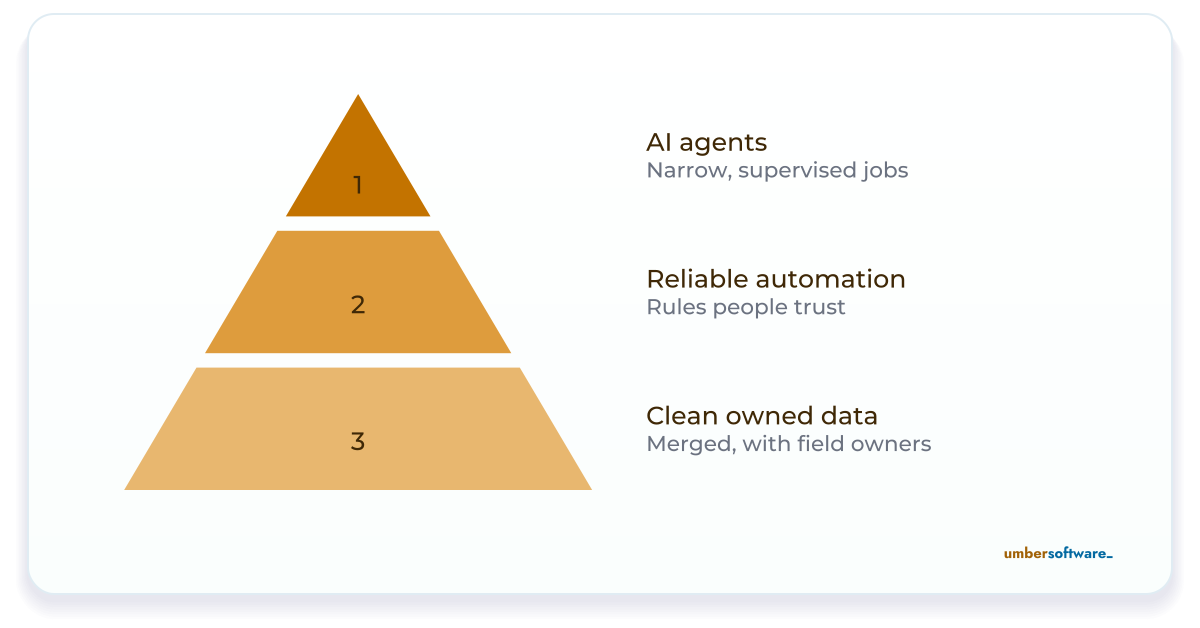
In practice, most agents I meet do narrow jobs, and the ones that work have a clear boundary on what they may change: answer a routine question, qualify an inbound lead or prepare a meeting brief. Start with one narrow task, a named owner and a human approval step. Give an agent access to only the records it needs. The comparison of platforms in my ranking of the best CRM software shows which vendors ship agents today.
2. AI Saves Time, but Few Teams Reinvest It
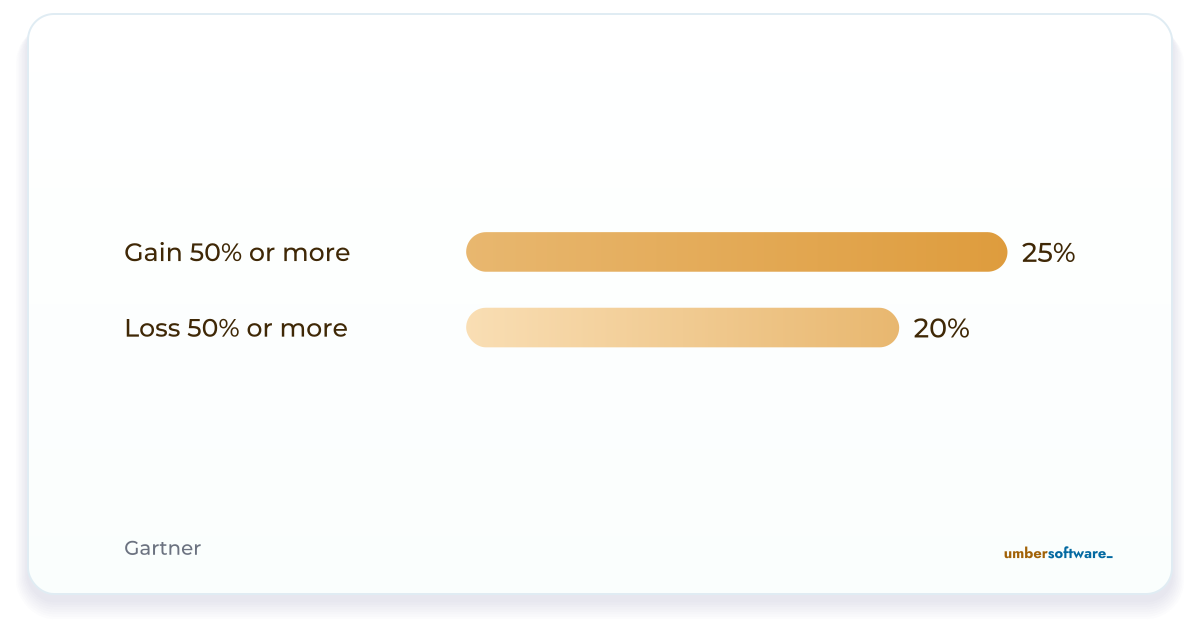
Gartner's survey of 210 sales leaders, fielded in early 2026, found that AI saves sellers an average of 4.8 hours per week, yet 72% of sales organizations report low reinvestment of that time. Returns are uneven: 25% report a return of 50% or more, and 20% report a loss of 50% or more.
Treat the saved hours as a budget you must spend deliberately. Decide before rollout what reps will do with the time: more first calls, deeper account plans or faster quotes. Then measure that activity, not the AI usage. A rep who gets 4.8 hours back and spends them on more admin has gained nothing, so tie the target to a number in your pipeline, such as new meetings booked per week.
3. Next Best Actions Become the Default Screen
Gartner reports that sales organizations that give sellers AI-enabled next best actions are 2.6 times more likely to achieve commercial growth, based on a survey of 227 chief sales officers.
The CRM home screen is changing from a list of records into a list of suggested actions. That works only if the suggestions are right, so check what data feeds them. If your stage dates or contact roles are unreliable, the suggestions will be wrong, and reps will stop reading them within a week. Ask your vendor which fields the suggestions use, and run the feature for a pilot group first. Compare their pipeline movement with a control group for one quarter before you roll it out to everyone.
4. Buyer Research Starts With AI
Gartner predicts that by 2027, 95% of sellers' research workflows will begin with AI, up from less than 20% in 2024. Its buyer survey of 645 people found that 45% already use generative AI to research vendors, as CX Today reports.
For you, that means account research, call preparation and lead enrichment are moving into the CRM itself. It also means buyers arrive better informed, so your reps need clean notes about what a prospect already read and asked.
5. Buyers Prefer Self-Service, Then a Human to Confirm
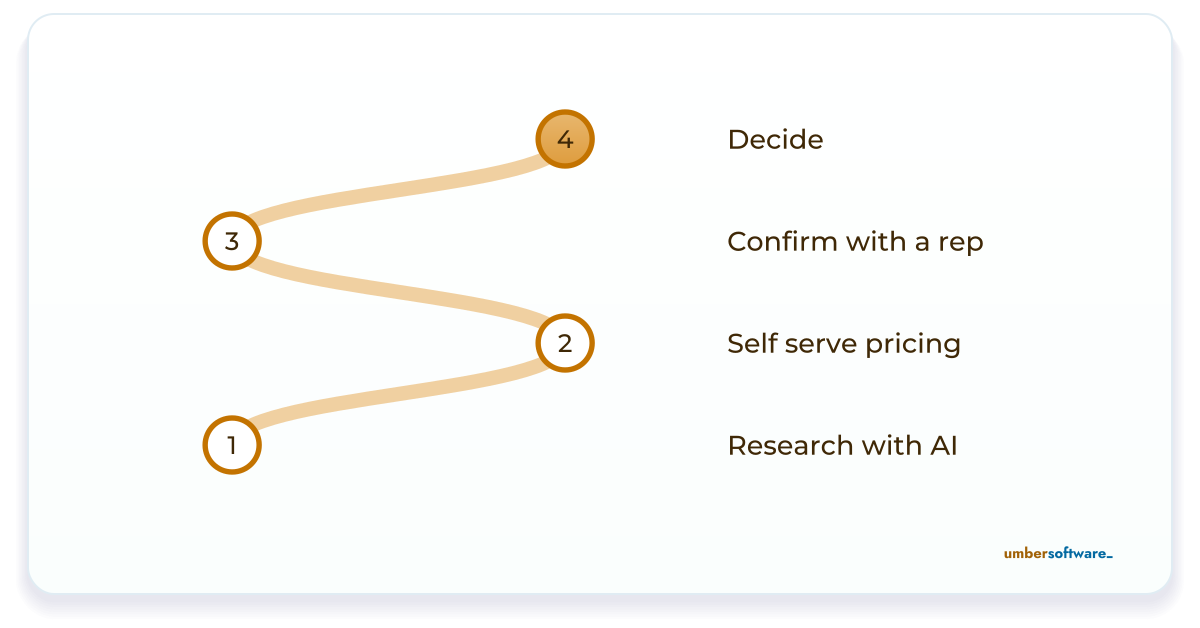
In the same Gartner survey, 67% of B2B buyers prefer an experience without a sales rep, and 70% prefer a fully digital, self-service environment. Yet 69% still check AI-generated insights with a human rep.
I read this as a split journey. Buyers research alone and bring in a person late. Your CRM should log digital behavior, such as pricing page visits and form fills, and show it to the rep before the first call. Marketing and sales then work from one timeline. Be careful with privacy here: tracking visitors by name needs a lawful basis in many countries, so confirm the rules with your own advisers before you switch it on.
6. Tool Consolidation Gains Ground
Salesforce's State of Sales research found that sales teams use an average of 10 tools, 66% of reps feel overwhelmed by the number and 94% of sales organizations planned to consolidate within a year. The study is from 2022, but the pattern still matches my client work.
Consolidation does not always mean one platform. Often it means fewer systems, better connections and one record per customer. Before you add a tool, ask which existing one it replaces. For connections to finance systems, align your plan with ERP software consulting.
7. Pricing Shifts From Seats to Seats Plus Usage
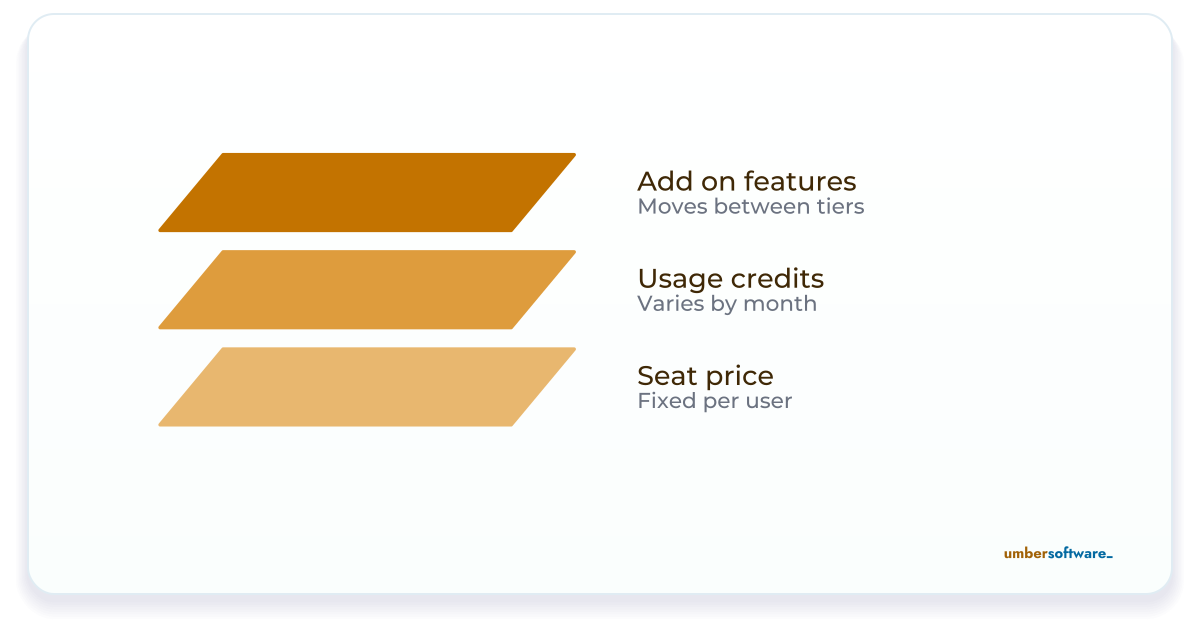
Per-seat pricing still defines most CRM price lists. Several vendors now add usage-based charges for AI features, so your bill depends on how often the feature runs. I have not found a standard unit across vendors, which makes comparison hard.
| Ask yourself | Why it matters |
|---|---|
| What counts as one unit of usage? | A conversation, an action and a credit can differ by a large factor. |
| Is there a cap or an alert? | Without one, a busy month can surprise finance. |
| Which features are included in the seat price? | Vendors move features between tiers. |
| What happens at renewal? | Introductory prices can end after the first year. |
Prices change often, so confirm the current price list with the vendor before you budget.
8. Automatic Data Capture Reduces Manual Logging
Newer CRMs and many established ones now pull email, calendar and call data into records without rep input. Copper, Attio and HubSpot all lean on this approach, as described in my best CRM software review. It addresses the problem that reps spend only 28% of their week selling, according to the same Salesforce research.
Automatic capture works best with a short list of required fields. Let the system fill in contacts and activities, and ask reps for the three or four facts only a human knows, such as budget and next step.
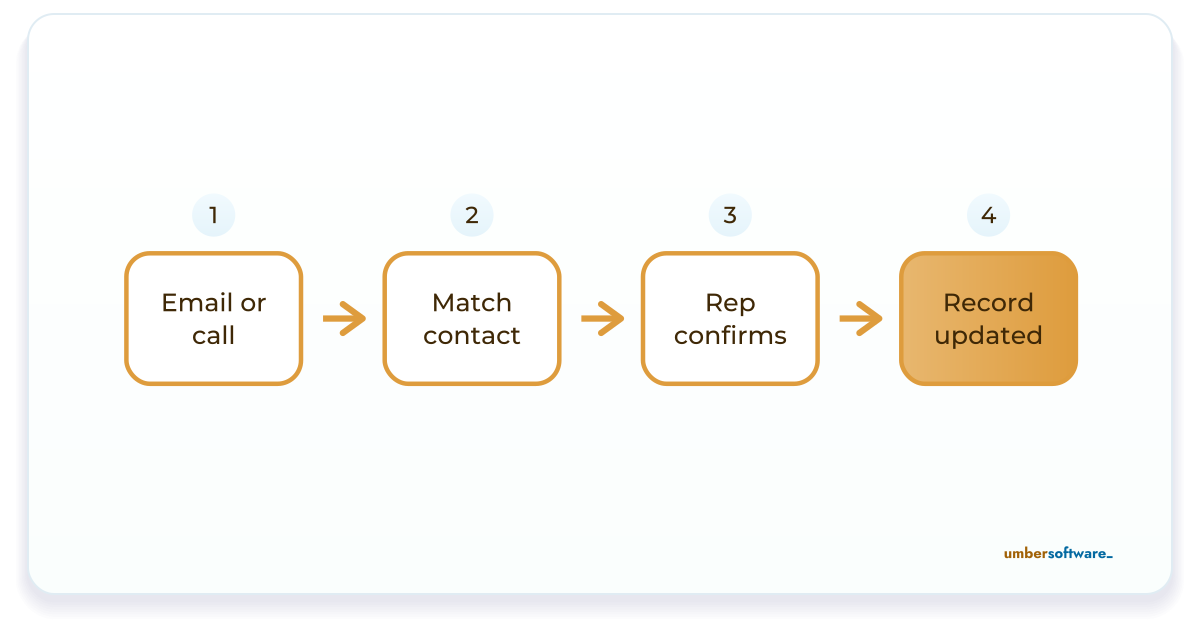
The weak spot is accuracy. Automatic capture can attach an email to the wrong account when two contacts share a company name, and it can log internal messages as customer activity. Review the matching rules in the first month, and give reps an easy way to correct a record, or the clutter will grow quietly.
9. Data Quality Becomes the Limit on AI
As AI features read your records, bad data turns into bad suggestions at scale. In the projects I review, duplicate accounts, missing roles and stale stages are the most common blockers. A data audit before an AI rollout takes a couple of weeks and saves months of distrust.
- Duplicate accounts are merged under a written survivor rule.
- Every important field has an owner and a definition.
- Stage dates and close dates are validated on entry.
- Access rules limit what AI features may read.
The steps in CRM software implementation put the cleanup in phase four, before configuration, for this reason.
10. Small and Mid-Sized Companies Drive Growth
Fortune Business Insights expects small and mid-sized companies to grow fastest within the CRM market, while large enterprises held 55.94% of 2026 revenue in its market report. HubSpot ended 2025 with 288,706 customers, about 16% more than a year earlier, according to its results release.
For you, that means more capable CRMs at lower price points, and more consultants and partners who know them. It also means more companies who outgrow their first CRM within a few years, so plan the data export before you need it, and test it once while the stakes are low. See the market numbers in CRM software statistics.
How to Choose Which Trends to Act On
| Trend | My bin | First move |
|---|---|---|
| Data quality and capture | Act now | Merge duplicates and name field owners |
| AI agents and next best actions | Test this year | One narrow pilot with human approval |
| Buyer self-service | Test this year | Log pricing page visits and form fills on the record |
| Consolidation | Act now | List your tools and retire one |
| Usage-based pricing | Watch | Ask for caps at the next renewal |
You cannot act on all ten. I sort trends into three bins: act now, test this year and watch. Data quality and automatic capture go in the first bin, because they pay off on any platform. Agents and next best actions go in the second, with a narrow pilot. Pricing changes go in the third, until your vendor sends you a new price list. Whatever you decide, write it down with an owner and a review date, so the list does not turn into a pile of good intentions.
Match each trend to a problem you already have. If your reps skip logging, capture comes first. If your forecast is unreliable, data quality comes first. For the case against rushing, read the balanced view in CRM software pros and cons, and for concrete uses see the CRM software examples.
Questions About CRM Software Trends
What Is the Biggest CRM Trend Right Now?
AI agents and AI assistants inside the CRM. Salesforce alone reports more than 29,000 Agentforce deals, and its survey says nine in 10 sales teams use agents or expect to within two years. The real change for you is smaller: summaries, drafted emails and suggested next steps appearing on records you already use.
Will AI Replace CRM Administrators or Salespeople?
I see AI taking over the repetitive parts, such as logging calls and drafting follow-ups. Gartner's buyer research shows 69% of buyers still check AI-generated insights with a human rep. Administrators shift toward data quality, permissions and process design, which AI features depend on.
Should I Wait for AI Features Before Choosing a CRM?
No. Every major vendor ships AI features, and the gap between them changes every quarter. Choose on process fit, integrations and total cost, and treat AI as a feature you will add and test in the first year. A CRM that your team will not use gains nothing from AI.
How Do I Prepare My CRM Data for AI?
Start with the basics: de-duplicate accounts and contacts, standardize key fields, assign an owner for each field and delete data you no longer need. AI suggestions are only as reliable as the records behind them. I would clean the data before you switch on the first AI feature.
Are Usage-Based Prices Going to Replace Per-Seat Pricing?
Not entirely, but several vendors now bill AI features by usage on top of seat licences. Read the price list for what counts as a unit, ask for a cap and model your expected volume. A feature that is cheap in a demo can be expensive at your real volume.
What Trend Matters Most for Small Businesses?
Automatic data capture. Tools that pull emails, meetings and calls into the record remove the manual logging that small teams skip first. Combined with a free or low-cost plan, that gets a small team to a usable CRM in days.
How Often Should I Review My CRM Strategy Against Trends?
Once a year is enough for most teams. Review your adoption numbers, your integration list and the AI features that your vendor shipped, then decide on two changes. Chasing every announcement costs more in disruption than it returns.
Please note: this guide is general information and not legal, financial or tax advice. Numbers and examples are typical-project estimates; confirm current details with your providers and advisers.
Did this article help you?
Thanks, noted.
Whitney Sorensen
Whitney leads the Umber editorial team and works with the consultants to turn real client projects into practical guides on software selection, custom development, integration and legacy modernization. Before joining Umber, she spent years writing and editing for engineering and IT teams. She has since reviewed architecture audits, system selections and modernization plans from client projects across industries from manufacturing to healthcare. She works remotely from the USA.