Main Points
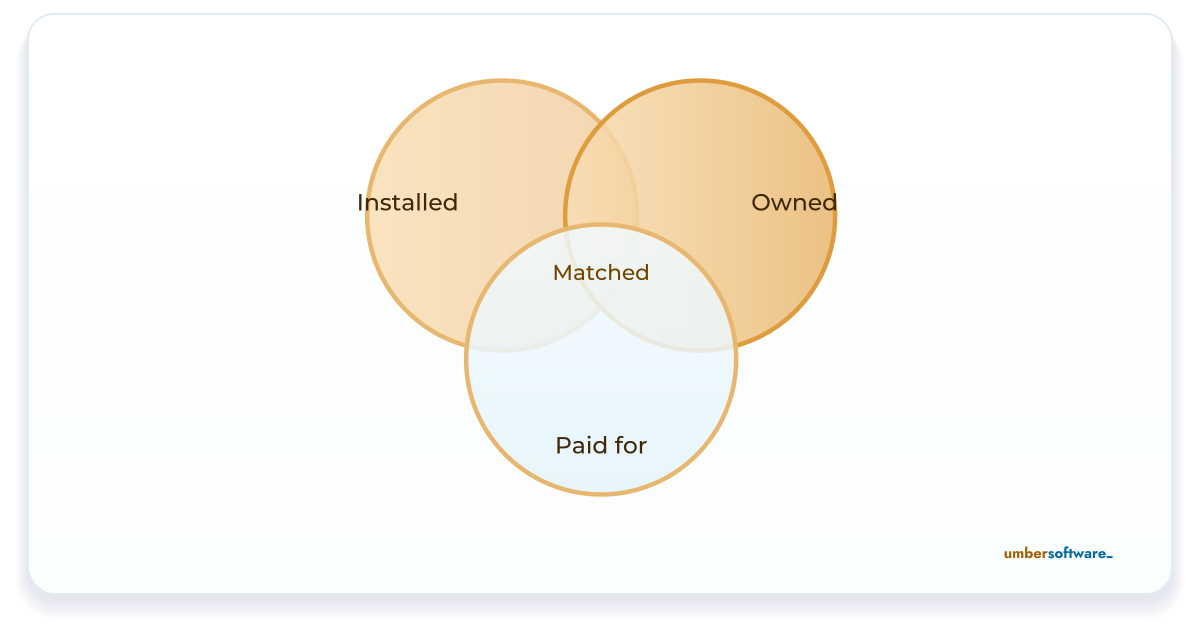
- An audit compares three lists: installed or assigned software, entitlements and spend.
- Start with your ten largest vendors, not every application.
- Gaps run in two directions: compliance risk and wasted licenses.
- Run your own audit before a vendor asks for one.
Most companies learn their license position when a vendor writes a letter. By then the clock is the vendor's, and the numbers are the vendor's too. A self-run audit flips that order. You find the gaps first, decide what to do and walk into any later conversation with your own evidence.
This guide shows how I run a software asset management audit, from scope to findings. It follows the same steps I use in software asset management consulting work, scaled down so a small team can do it.
What a Software Asset Management Audit Covers
An audit answers three questions for each vendor. What are we running or subscribed to? What are we entitled to use? What do we pay for it? The gap between the first two is compliance risk, and the gap between the second and the first, in the other direction, is waste.
It is not a security scan or a code review. It reads contracts, order forms, inventory exports and invoices, and it connects them. The output is a table per vendor with a position, an estimate of the cost of each gap and a recommended action.
| Audit type | Who starts it | Who controls the rules | Typical use |
|---|---|---|---|
| Internal audit | You | You | Find gaps, prepare for renewals |
| Vendor audit | The publisher | The publisher's contract terms | Verify compliance, sometimes lead to a settlement |
| Third-party review | You or a buyer | The agreed scope | Independent view for a merger or a board |
Set the Scope Before You Collect Anything
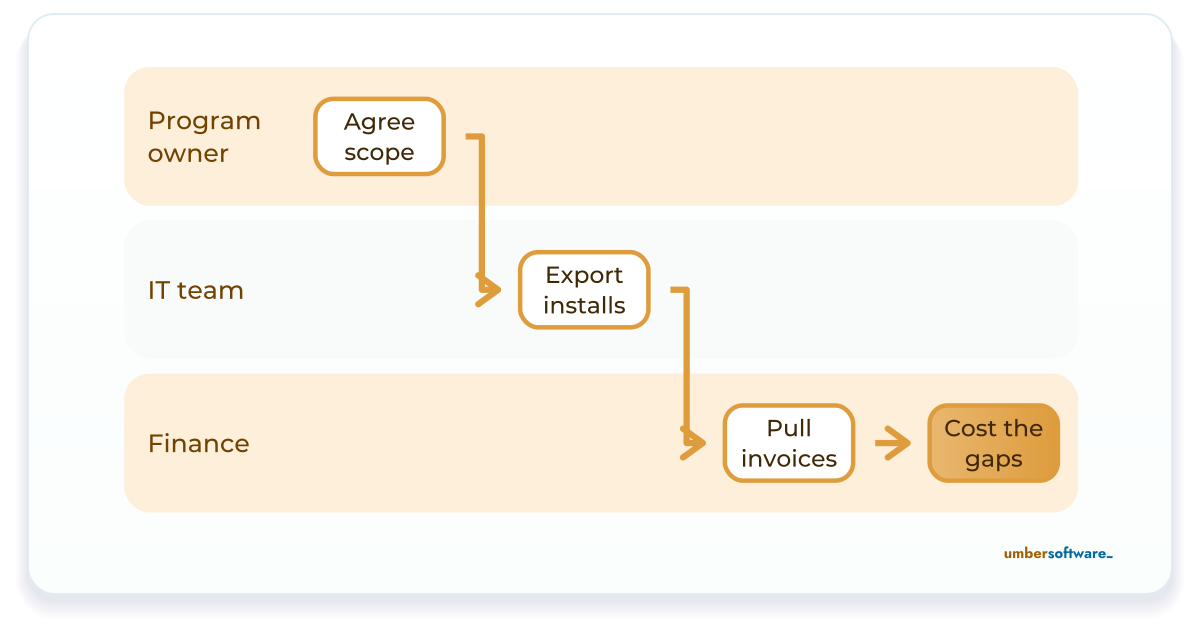
Pick the vendors by money and by risk. Rank your software contracts by annual spend, then add any publisher with a history of audits, such as Microsoft, Oracle, SAP, Adobe or IBM. Ten vendors are a realistic first round. Write the list down and agree on it with finance, so nobody questions the scope later.
Next, fix the time frame. An audit is a snapshot, so choose a date and take every export on or near it. If exports are collected over six weeks, headcount and installs will have shifted and the numbers will not match.
Collect Three Sets of Data
Entitlements. Gather contracts, order forms, amendments and proofs of purchase. For each product, record the license metric, such as named user, device, core or concurrent user, the quantity, the term and the support level. The metric is the part people skip, and it decides whether a count is compliant.
Usage. Export installs from your device management tool, assigned seats from your identity provider and admin consoles, and, where you can, actual usage data. Installed does not mean used, and assigned does not mean active. Both views are useful.
Spend. Pull invoices and card or expense data for the same vendors. Spend that shows up in finance with no matching contract is a common find, and it is usually a team subscription started on a corporate card.
Reconcile Installs, Rights and Invoices
Build one row per product and compare the three numbers. Before you trust any count, clean the inputs: remove leavers, retired machines and test accounts. In one project, cleaning device records removed 41 apparent over-installs before anyone had to discuss them with a vendor.
Then apply the license metric. A product licensed per core needs a core count from servers and virtual hosts, which means you need your virtualization data. A product licensed per user needs a de-duplicated user list. Mixing metrics is the most common source of wrong positions I see, and it is why an audit needs someone who can read the contract as well as the inventory.
Record every assumption in a short note next to the row. A position without its assumptions is not defensible later. The structure of the process follows the steps in my software asset management framework, which separates discovery, entitlement, reconciliation and action.
A Four-Week Plan for a First Internal Audit
A fixed schedule keeps the audit from drifting. This plan fits ten vendors and a team of two or three people working part time. Dates slip when contracts are missing, so build a week of slack into the plan if you cannot find your order forms quickly.
| Week | Focus | Output |
|---|---|---|
| 1 | Scope, vendor list and contract hunt | Agreed vendor list and a folder of contracts |
| 2 | Exports from devices, identity and billing | Cleaned inventory with leavers and retired devices removed |
| 3 | Reconciliation per vendor and license metric | One row per product with a position and assumptions |
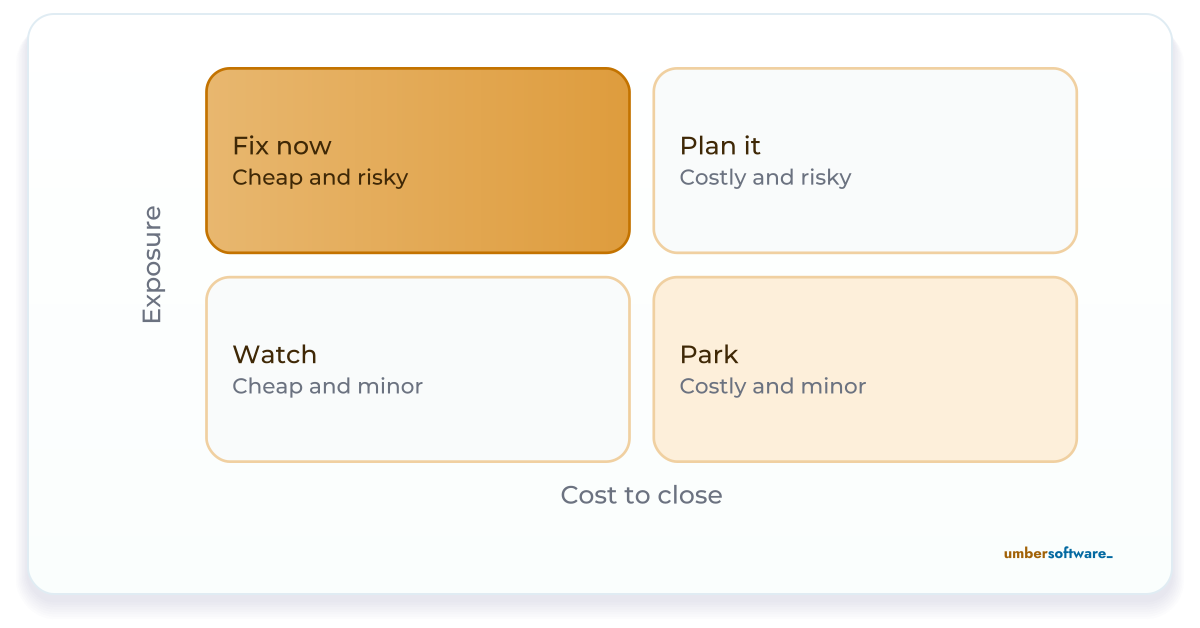
| 4 | Cost of each gap, review with finance | Findings sorted into fix now, plan and watch |
If a vendor letter arrives during the audit, do not rush a reply. Acknowledge it, ask for the contract clause that allows the request and keep working on your own numbers. A calm, documented answer gives you time to finish your own picture of what you run and own.
The Findings I See Most Often
Patterns repeat across companies. These are the ones worth looking for first:
- Retired devices still counted as installs, which makes you look over-deployed.
- Paid seats for people who left, or who never signed in.
- Product editions installed above what was purchased, such as a premium edition installed where a standard one was bought.
- Virtual machines with a per-core product that moved across hosts and multiplied the core count.
- Subscriptions on personal or team cards that nobody approved.
- Support fees paid on licenses that were retired years earlier.
Not every gap deserves action. Estimate the cost of closing each one and compare it with the cost of leaving it. A small shortfall on a cheap product may not be worth chasing. A shortfall on a core-based database license is a different matter, and should be at the top of your list.
What an Audit Is Worth
Savings come from three places. Surplus seats can be cut at renewal, unused products can be cancelled and support paid on retired licenses can be dropped. Risk reduction is harder to price, but you can estimate it as the cost of closing the shortfall at list price, which is what a vendor might ask.
A mid-sized client of mine, a healthcare group with about 1,400 staff, found 212 inactive seats across four SaaS products and a support fee on retired licenses. After cleaning the records, the savings at renewal paid for the audit several times over. The group also found a modest shortfall on a database product, which it closed by consolidating servers before any vendor asked.
Auditing SaaS Subscriptions Differently
Installed software and SaaS need slightly different handling. SaaS rarely carries audit risk in the same way, because the vendor sees every login. The risk is waste: seats assigned and never used, overlapping tools and plans that grew silently. For SaaS, your key data sources are the identity provider, the vendor's admin console and card spend.
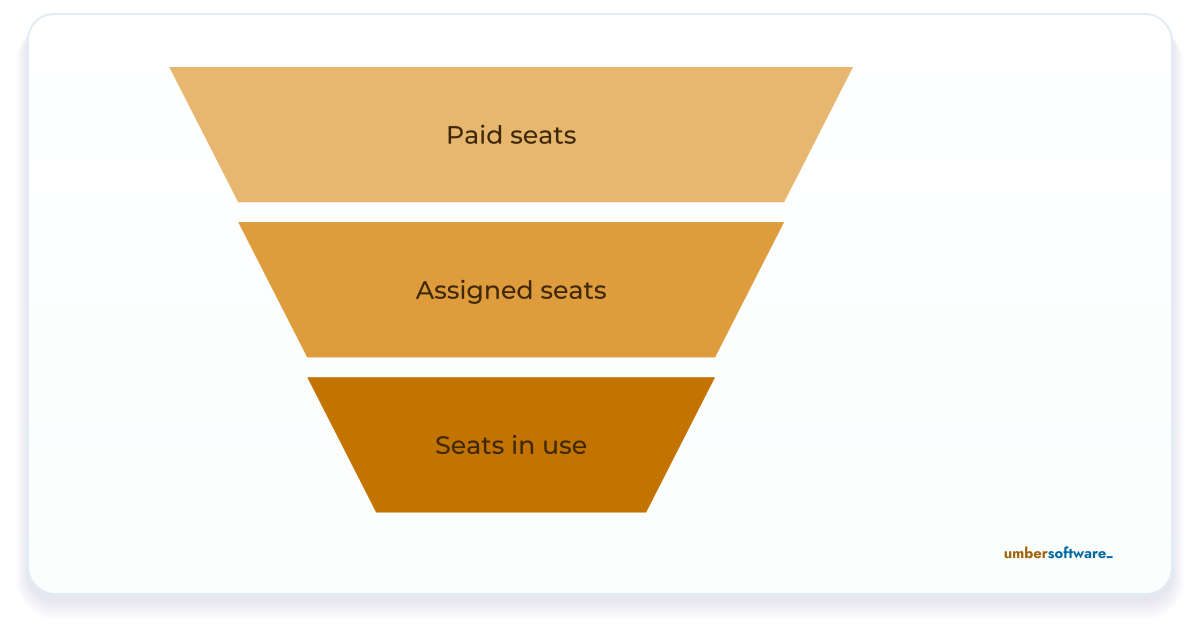
I look at three numbers per product: paid seats, assigned seats and seats active in the last 90 days. A wide gap between the first and the last is the saving. Ask each product owner to justify the gap before renewal. Most owners reduce the count once they see the data, and the conversation is easier when the numbers come from their own admin console.
Acting on the Results
Sort findings into three piles. Fix now covers cheap gaps and clear waste, such as removing leavers and cancelling idle seats. Plan covers gaps that need budget or a change of architecture. Watch covers items that are not worth acting on this quarter, each with an owner and a date.
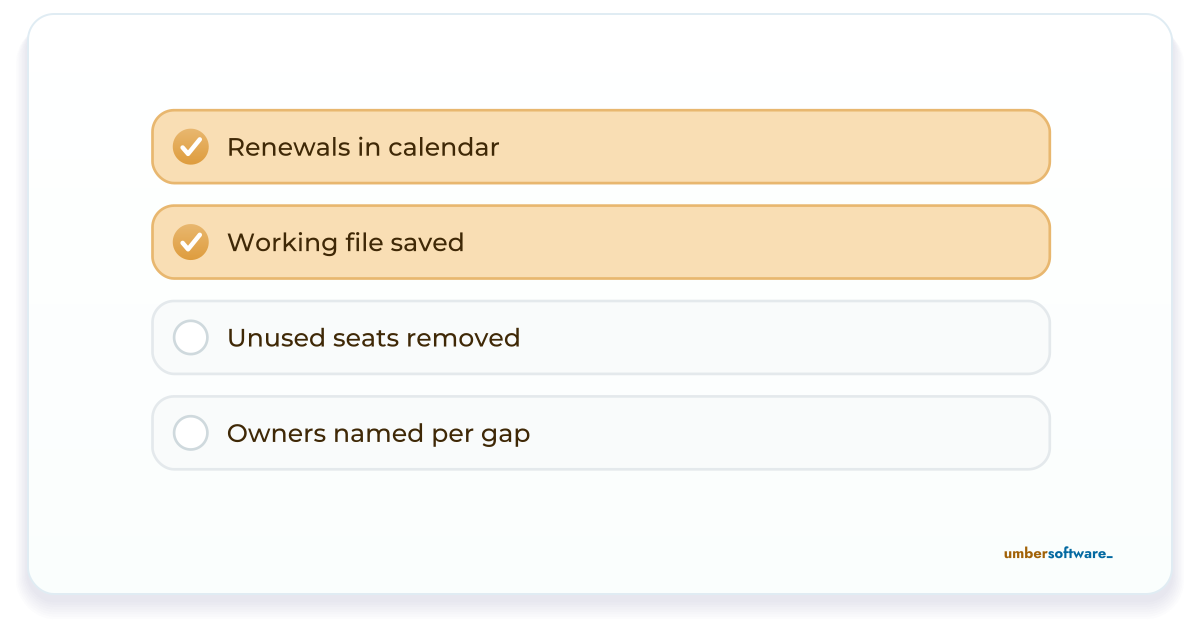
Then lock in the gains. Put each renewal date in a calendar with a 120-day warning, and set a monthly reconciliation so the next audit starts from clean data. The software asset management best practices article lists the habits that keep an audit from decaying. For the order in which to introduce them, use the software asset management roadmap.
Expect friction. Teams will push back when an unapproved tool is removed, and some counts will be disputed. Hold on to the evidence, and keep the conversation about what the business needs. Many blocked audits go wrong because the findings arrive as accusations. Present them as a list of decisions, each with a cost.
One last habit helps more than it seems. Keep the working file, with its assumptions and dates, after the audit ends. When the next audit starts a year later, you can compare positions vendor by vendor and see which gaps closed, which grew and which new products appeared in between.
How to Choose Between Doing It Yourself and Bringing In Help
A first audit of ten vendors is realistic for a capable internal team. Bring in outside help when:
- Core-based or processor-based database and middleware licenses are in scope.
- A vendor has already sent an audit notice.
- Nobody in your company can read the license metrics in the contracts.
- You need a neutral view for a merger or board review.
Tools can speed up the data work. My comparison of software asset management tools shows which ones suit audit-driven work and which are built for SaaS. Teams that skip the preparation often run into the software asset management challenges I describe elsewhere, especially poor data and missing contracts.
Questions About Software Asset Management Audits
What Is a Software Asset Management Audit?
It is a structured review that compares what software you run or subscribe to with what you are entitled to use and what you pay for. The result is a list of gaps in both directions: compliance risk where you use more than you own, and wasted spend where you own more than you use.
Is an Internal Audit Different from a Vendor Audit?
Yes. An internal audit is yours: you choose the scope, the time frame and how you read the contracts. A vendor audit is requested by the publisher and follows its rules. An internal audit done a few months earlier is the best preparation for the second kind.
How Long Does an Internal Audit Take?
For ten vendors and a few hundred users, plan for three to six weeks, most of it spent finding contracts and cleaning device records. The analysis itself is quick once the data is trustworthy.
What Should I Do If I Find a Compliance Gap?
Write it down with the evidence, confirm the license metric in the contract and estimate the cost of closing it. Then decide whether to remove installs, buy licenses or change the product. Avoid contacting the vendor until you understand your own position.
Who Should Lead the Audit?
A person who can read contracts and understand technical inventory, with support from procurement and finance. Many companies bring in an outside reviewer for the first round, because the people who run the systems often struggle to question their own records.
How Often Should I Audit?
Once a year for your top vendors, plus a short check before each major renewal and after any merger, large migration or restructuring. A monthly reconciliation keeps the yearly audit short.
Do I Need a Tool for an Audit?
No, but a tool saves time on large estates. For a first audit of ten vendors, a spreadsheet and exports from your device management, identity and billing systems are enough. The method matters more than the software.
Please note: this guide is general information and not legal, financial or tax advice. Numbers and examples are typical-project estimates; confirm current details with your providers and advisers.
Did this article help you?
Thanks, noted.
Whitney Sorensen
Whitney leads the Umber editorial team and works with the consultants to turn real client projects into practical guides on software selection, custom development, integration and legacy modernization. Before joining Umber, she spent years writing and editing for engineering and IT teams. She has since reviewed architecture audits, system selections and modernization plans from client projects across industries from manufacturing to healthcare. She works remotely from the USA.