Main Points
- Seven repeating risks cause most software security problems, from outdated dependencies to insecure design.
- Scanners find dependency, secret and injection issues well but struggle with access control and design flaws.
- Risks combine: an exposed secret, an open pipeline and weak logging together let an attacker stay hidden.
- Fix cheap, high-exposure items first, then schedule the longer work with owners and dates.
Software security risks come from a short list of repeating causes. The same seven show up in nearly every review that our software security consulting team runs, and they appear regardless of industry or language. Knowing them helps you aim your effort where the exposure is.
Each risk below includes how it hurts you, the pattern I see in practice and a short list of steps to reduce it. If you want to find out which ones affect you right now, a software security audit or a lighter security assessment will show you.
The Seven Risks and Where They Hit
| Risk | What goes wrong | Usual first fix |
|---|---|---|
| 1. Outdated dependencies | Known flaws sit unpatched | Inventory and patch deadlines |
| 2. Broken access control | Users reach other users' data | Server-side checks on every request |
| 3. Injection | Input runs as a command | Parameterized queries |
| 4. Exposed secrets | Keys leak through code | Secrets manager and rotation |
| 5. Insecure pipelines | Build path is tampered with | Restrict and verify the pipeline |
| 6. Weak logging | Breaches go unseen | Alerts on a short list of events |
| 7. Insecure design | Features are abusable by design | Threat modelling |
Several of these map to the OWASP Top 10, a public ranking of web application risks. Others, such as pipeline weaknesses, reflect newer attack patterns described in CISA and SLSA guidance. The list below goes from risks I find most often to ones that are rarer but costly.
Seven Software Security Risks and How to Reduce Each
1. Vulnerable and Outdated Dependencies
Modern applications are mostly other people's code. A typical web product pulls in hundreds of libraries, and each one can carry a known flaw. Attackers scan the internet for the same published weaknesses you have not patched, so exposure begins the day a flaw becomes public, not the day someone targets you.
The pattern I see most is not a missing tool but a missing owner. The scanner flags forty packages, nobody is assigned, and the list grows quietly. Exposure then compounds, because old versions are harder to upgrade each release you skip.
How to reduce this exposure
- Generate a software bill of materials on every build.
- Subscribe to alerts for the packages you use.
- Set patch deadlines by severity and name an owner.
- Upgrade in small steps rather than every two years.
- Remove packages that nothing uses.
- Check the CISA Known Exploited Vulnerabilities list for flaws seen in attacks.
Tools that help
Dependency scanners and software composition analysis tools handle the inventory and alerts. The application security tools comparison covers the main options.
2. Broken Access Control
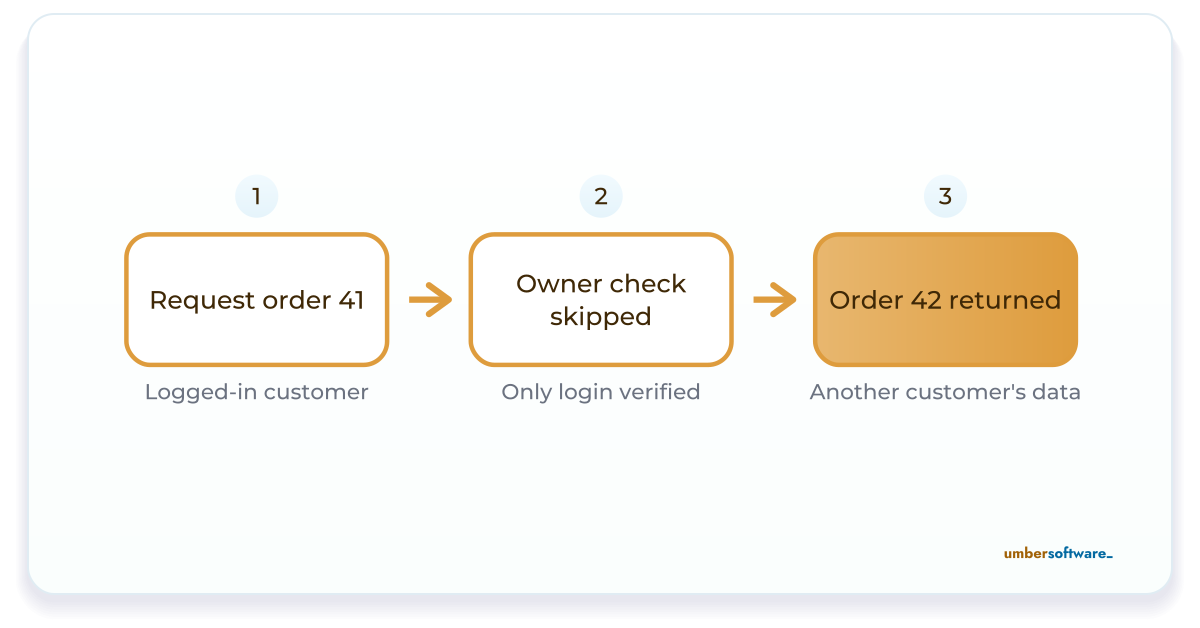
Access control decides which user may see or change which record. When it fails, one customer can read another's data by changing a number in a web address. It tops the OWASP Top 10 because it is common and because scanners struggle to detect it, since the rules belong to your business.
These flaws often hide in newer endpoints. The login page is secure, but a recently added export function checks only that the user is signed in. In audits, a single missing check usually repeats across several similar endpoints.
Steps that shrink the risk
- Check authorization on the server for every request.
- Deny by default and grant access explicitly.
- Test with two accounts and try to cross between them.
- Log refused access attempts and review spikes.
- Centralize permission checks in one shared layer.
Where tooling fits
Manual testing with two accounts finds most cases. API testing tools can script the same checks for every release.
3. Injection Flaws
Injection happens when user input is treated as a command, as in SQL queries, operating system calls or template engines. The attacker types a command into a form field and your system runs it. The damage ranges from data theft to full server control.
This is an old problem with a well-known fix, and it still appears. It usually returns through a rushed report feature, a legacy module or a hand-built search filter that skips the safe pattern the rest of the code uses.
Mitigation, step by step
- Use parameterized queries for every database call.
- Rely on framework output encoding for pages.
- Validate input by type, length and allowed values.
- Run static analysis for injection patterns on each pull request.
- Give database accounts only the permissions they need.
Useful tools for this risk
Static analysis scanners catch many patterns, and dynamic scanners test running applications. Together they cover most of the well-known cases.
4. Exposed Secrets and Credentials
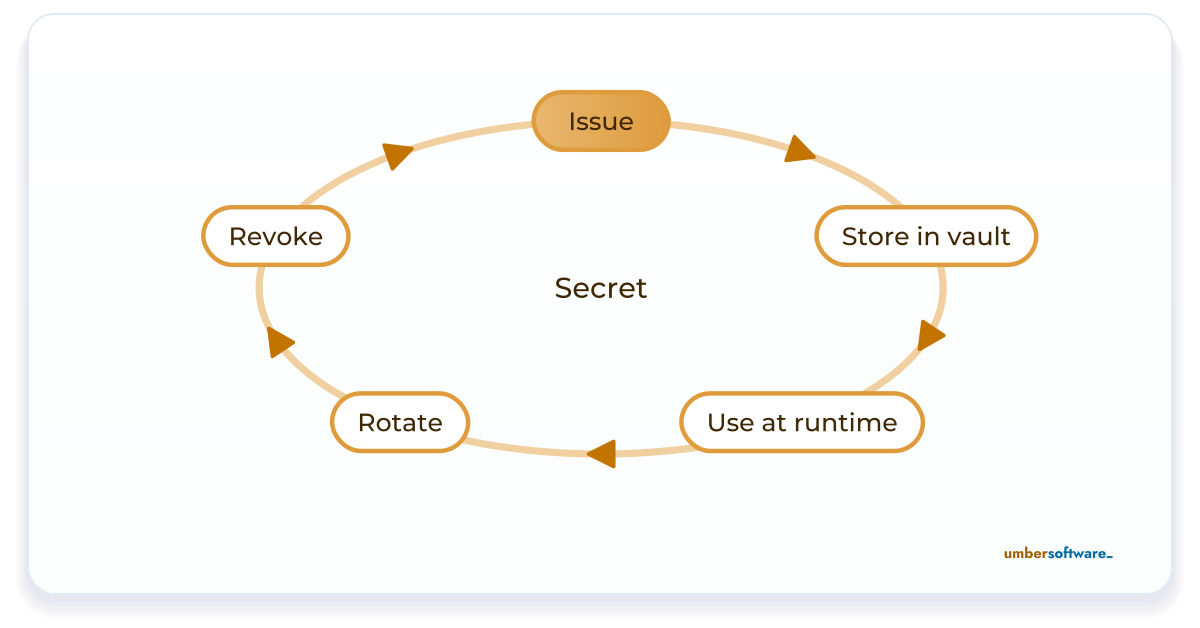
Keys, tokens and passwords committed to a repository or left in a config file give attackers a direct way in. Automated bots scan public repositories within minutes of a push. Private repositories are not safe either, since access spreads over time.
I have seen a cloud key sit in a repository for three years before anyone noticed. By then, 22 people and two former contractors had cloned it. Deleting the file did nothing, because the key lived on in history and in every clone.
What to do about it
- Move secrets into a managed secrets store.
- Scan full repository history for existing leaks.
- Rotate every secret found, immediately.
- Block commits that contain key patterns.
- Use short-lived credentials wherever the platform allows.
Tooling worth looking at
Secret scanners run as pipeline steps or commit hooks. Most code hosting platforms also offer built-in secret scanning.
5. Insecure Build and Deployment Pipelines
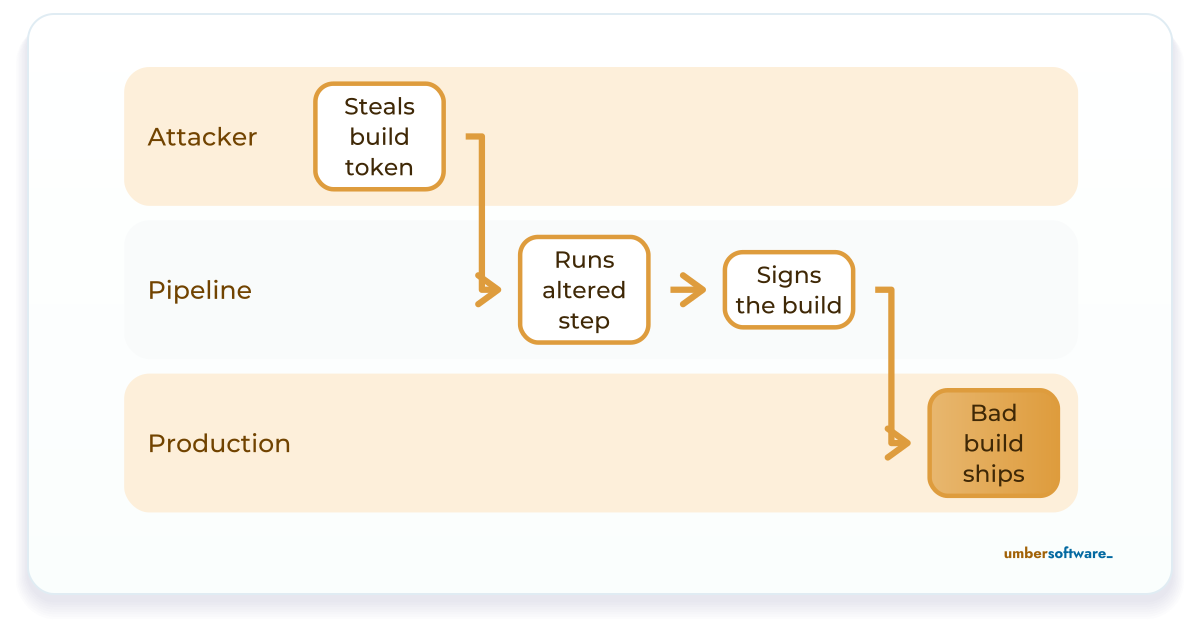
Your pipeline holds the keys to production. If an attacker changes a build step, they can ship malicious code that carries your signature. Supply chain attacks on build systems have hit large vendors, and smaller ones tend to have weaker defenses.
Teams protect production carefully and leave the pipeline open to everyone with repository access. Shared credentials with broad permissions are the usual weak spot, along with build steps that download tools from the internet without checking them.
Moves that lower the exposure
- Limit who can edit pipeline definitions.
- Use short-lived, narrowly scoped deploy credentials.
- Pin the versions of build tools and actions.
- Verify or sign build outputs where tooling supports it.
- Review pipeline changes the same way as application code.
What to use
The SLSA framework describes levels of build integrity you can adopt step by step. Many CI platforms offer protected branches and environment approvals.
6. Weak Logging and Slow Detection
Without useful logs, you learn about a breach from a customer or a journalist. Attackers often stay inside systems for weeks, and the damage grows with every day of delay. Logging problems rarely cause an incident, but they turn a small one into a large one.
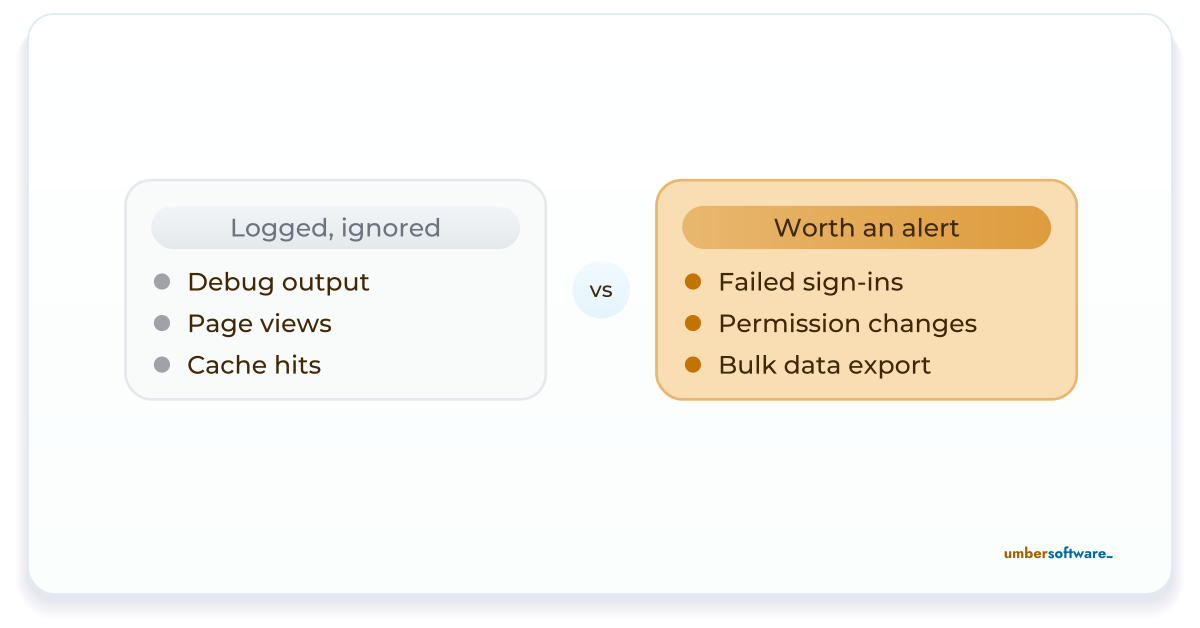
Most teams log plenty and watch nothing. Sign-in failures, permission changes and unusual data exports sit in a store nobody reads. The fix is a short list of events with alerts that reach a real person.
Practical fixes in order
- List the ten events that signal trouble in your product.
- Send logs to a store that attackers cannot easily edit.
- Alert on those events and name who responds.
- Keep sensitive data out of logs.
- Test the alerts by triggering one on purpose.
Helpful tooling
Log platforms and security monitoring services handle storage and alerts. A small team can start with the alerting built into its cloud provider.
7. Insecure Design and Missing Threat Modelling
Some flaws cannot be fixed with a patch because the feature works exactly as designed. A password reset that reveals whether an email exists, or a discount flow that can be repeated without limit, are design problems. Scanners will never flag them.
These issues are the most expensive to fix late, since they may require redesign and data migration. A 45-minute threat modelling session per major feature catches many of them while they are still a drawing.
Ways to close the gap
- Draw the data flow for each high-risk feature.
- Mark where data crosses a trust boundary.
- Ask what could go wrong at each crossing.
- Turn each answer into a ticket with an owner.
- Review the model again when the feature changes.
Tool options
Whiteboards and simple diagram tools are enough to start. Structured methods such as STRIDE give your team a shared checklist of questions.
How Three Risks Chain Into One Incident
A retail software team I worked with had no single dramatic flaw. An access key sat in an old repository branch (risk 4). The deploy pipeline accepted that key's role without extra approval (risk 5). Logging for the cloud account was turned on but nobody read it (risk 6). An outsider found the key, pushed a small change that skimmed order data, and went unnoticed for 19 days.
Each weakness alone looked minor in the audit, and each had been rated low priority on its own. Together they formed a complete path. After the incident, the team rotated the key, restricted the deploy role, added alerts for new admin actions and shortened the time to detect similar events to under an hour.
Look at your own risks in combinations, not one at a time. Ask what an attacker could do if they got past each weakness in order, and fix the link that cuts the most paths.
Which Risk to Tackle First
Do not try to fix all seven at once. Rank them by how exposed you are today. If you have never checked your dependencies, start there, since it is cheap and the number of known flaws is usually large. If you handle customer records in multiple accounts, move access control to the front. The security checklist puts these in a workable order.
Remember that risks interact. An exposed secret plus an insecure pipeline plus weak logging means an attacker can get in, push code and stay hidden. Reducing any one of the three raises the effort required, and reducing two usually makes the attack not worth attempting.
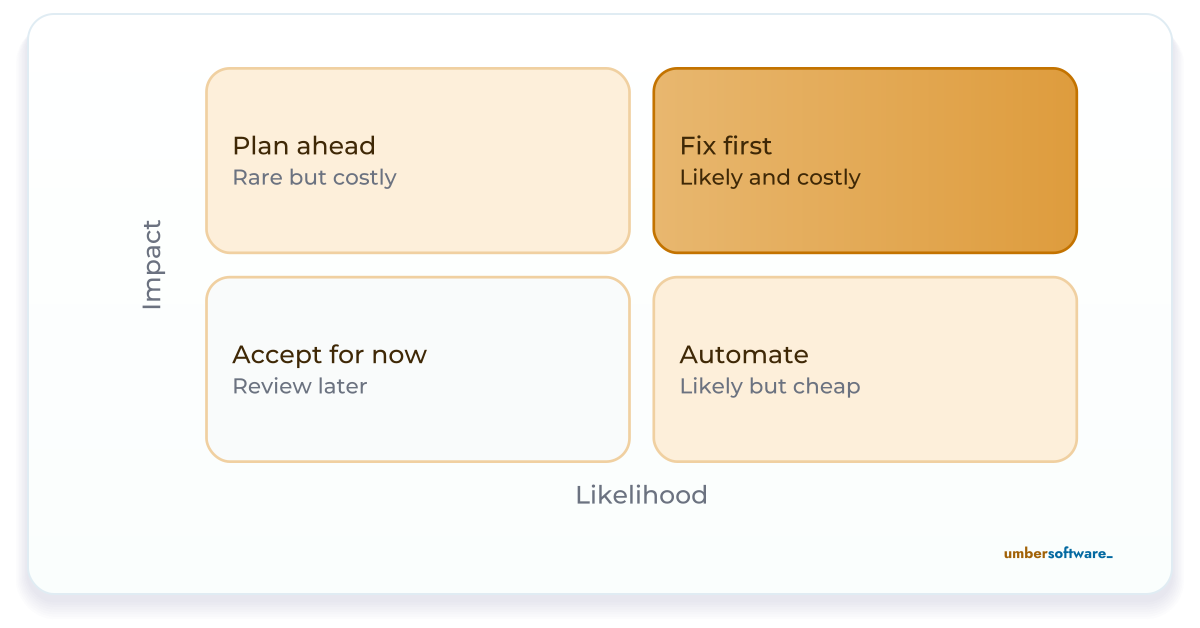
To organize ongoing work, a repeatable software security framework keeps risk reduction from depending on whoever is available that month.
Choosing Where Outside Help Pays Off
Your team can handle dependencies, secrets and basic pipeline settings with the right tools. Outside help pays off most for access control testing, threat modelling facilitation and any review that needs independence. In each of these, someone who has seen many systems spots patterns your team has stopped seeing.
- Can you list the dependencies you ship today?
- Could one customer reach another's data through any endpoint?
- Where are your secrets, and who can read them?
- Who can change your build pipeline?
- Which alerts would fire if an admin account were created tonight?
Any question you cannot answer in a minute marks a risk worth reviewing first.
Questions About Software Security Risks
What Are the Most Common Software Security Risks?
Outdated dependencies, broken access control, injection flaws, exposed secrets, insecure build pipelines, weak logging and insecure design cover most of what appears in reviews. Many of them match the OWASP Top 10.
Which Risk Should I Fix First?
Start with the one where your exposure is highest and the fix is cheapest. For most teams that means dependency patching or secrets cleanup, since both take days and remove well-known ways in.
How Do I Find Out Which Risks Affect My Software?
Run a short assessment or a full audit. An assessment shows where your practices are weak, and an audit finds specific flaws with evidence. Dependency and secret scans give quick first results.
Can Scanners Find All of These Risks?
No. Scanners are good at dependencies, secrets and many injection patterns. They struggle with access control and design flaws, which need manual review and threat modelling.
Are Small Companies at Real Risk?
Yes. Attackers use automated tools that scan for known weaknesses, so size does not protect you. Small teams often have fewer controls, which makes the common risks easier to exploit.
How Often Do These Risks Change?
The core list changes slowly, but specific vulnerabilities appear every week. Review your exposure after major releases and check dependency alerts continuously.
Does Fixing These Risks Guarantee Safety?
Nothing guarantees safety. Fixing these seven makes attacks much harder and limits the damage when something slips through. Keep monitoring and practice your incident response.
Sources
- OWASP Top Ten
- CISA Known Exploited Vulnerabilities Catalog
- SLSA, Supply-chain Levels for Software Artifacts
Please note: this guide is general information and not legal, financial or tax advice. Numbers and examples are typical-project estimates; confirm current details with your providers and advisers.
Did this article help you?
Thanks, noted.
Whitney Sorensen
Whitney leads the Umber editorial team and works with the consultants to turn real client projects into practical guides on software selection, custom development, integration and legacy modernization. Before joining Umber, she spent years writing and editing for engineering and IT teams. She has since reviewed architecture audits, system selections and modernization plans from client projects across industries from manufacturing to healthcare. She works remotely from the USA.